




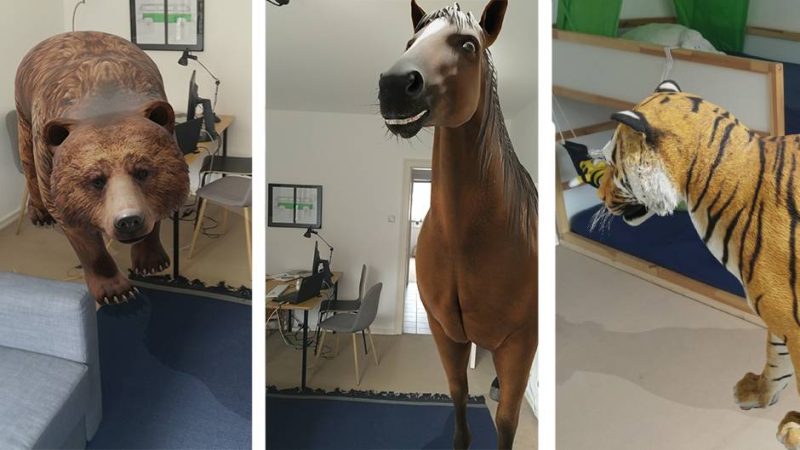

If you want to experience a lion, bear or tiger up close, you no longer have to go to the zoo or on safari (you can't at the moment anyway because of coronavirus). With AR, you can simply pull out your smartphone, as Google brings a selection of four-legged friends virtually into your living room.
Google had already announced at its I/O conference in 2019 that it would bring various animals and other objects into users' homes via smartphone. The objects were selected and added to the database as Google strongly believes that the best way to learn about something is to see it. By using AR to see the animals as if they were real, users get a real idea of how big they are. You can also see many details that you might not see in a normal picture.
How to get to the animals
Ihr braucht ein Smartphone oder Tablet mit Android 7.0 oder neuer oder iOS 11.0 oder neuer. Suche dann in der Google-Suche auf dem Gerät beispielsweise nach Pferd. In den Suchergebnissen erscheint weit oben eine Box mit einer Animation des Tieres und der Schaltfläche „In 3D ansehen“. Der Klick führt in den Kameramodus. Nun muss noch der Boden austariert werden und einen Moment später steht ein Pferd im Flur (und schnaubt sogar).
These animals and other things are currently available in 3D
And indeed, the list of available augmented reality objects is now quite long. Note: As a rule, the German terms in brackets also work. If not, enter the English term to be on the safe side.
- Alligator (Alligator)
- Angler fish (Angler fish)
- Brown bear
- Cat
- Cheetah (Cheetah)
- Dog (dog)
- Labrador Retriever (Labrador)
- Pug (Pug)
- Rottweiler (Rottweiler)
- Duck
- Eagle
- Emperor penguin (Emperor penguin)
- Giant panda (Giant panda)
- Goat
- Hedgehog (hedgehog)
- Horse (Horse)
- Lion (lion)
- Macaw (Macaw)
- Octopus (Okopus)
- Shark (Shark)
- Shetland pony (Shetland pony)
- Snake (snake)
- Tiger (Tiger)
- Turtle (tortoise)
- Wolf (Wolf)
- Human Skeleton (Skeleton)




 Deutsch
  Français
  English (UK)
  Italiano